
List of Books
The list of books occupies the main part of the "Accounting" tab".
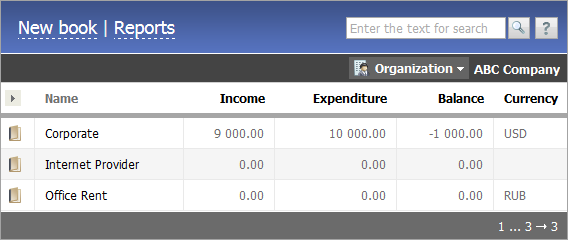
The upper part of the tab contains two buttons:
Books are divided into two categories: open and closed; they are displayed on the corresponding tabs of the "Accounting" module.
Open Books
In order to view a book one should press on its line in the list. When you hover the mouse cursor over an item on the list, the following buttons appear at the end of the line:
 Edit
Edit
Press on this button to go to the editing of the selected book. Close
Close
This button is used for moving a book into the "Closed" section.
Above the list of books there is a field for selecting an organization, for which values in the "Income", "Expenditure" and "Balance" fields in each book, where this organization is present, will be shown:

A left mouse-button click on this field will open a list of organizations available in the corresponding module. After one selects an organization, fields "Income", "Expenditure" and "Balance" will show totals for each book, in which the selected organization has participated in any payments.
A list of books can be adjusted. Using the  button located above the column with book icons fields to be displayed in the list can be selected. A menu of available fields will appear after the button is pressed:
|
|
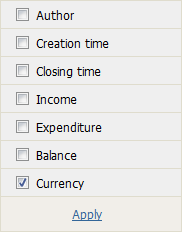
Information in fields "Income", "Expenditure" and "Balance" is shown for the organization selected above the list. |
Necessary fields should be selected in this menu and the "Apply" button should be pressed.
The list can be sorted by field "Name", "Creation time", "Modification time", "Closing time". To do this, one should click on the heading of the corresponding column.
Each page can contain up to 20 books. If the number of books is larger, a page selector appears below the list.
This tab also contains the search line. A word or combination of words is to be entered here and then the  button should be pressed. There is also a possibility of a temporary filtration of books displayed in the list. In order to do this, one should enter a necessary combination of symbols in the search line and then press the
  button. As distinct from a usual TeamWox search, the search in book filtration is performed by the sub-line, i.e. books, in the fields of which the entered combination of symbols is found, will be shown.
Closed Books
The list of closed books can be viewed in the corresponding tab. Closed books can be viewed, but cannot be edited. When pointing a mouse cursor over an entry in the list, the following buttons will appear at the end of the line:
 Information
Click on this button to view information on this book that was entered during book creation or editing. Restore
Using this button one can return a book into the list of "open books". Delete
Using this button one can completely delete a book from the system.
In the remaining points work with the list of closed books is similar to that with the list of open books.
← Create/Edit
View →
|