
- Welcome
- Home
- Tasks
- Documents
- Service Desk
- Chat
- Organizations
- Contacts
- Board
- Team
- Products
- Accounting
- E-Bank
- Search
- Calendar
- Telephony
- Administration
- Groups
- Users
- Activation
- Articles
- Backup
- Connection
- Console Commands
- Export
- Firewall
- Overview
- Import
- Import from AD
- Journal
- Service Operations
- Modules
- News
- Permissions
- Requests
- Security
- Settings
- Sounds
- Statistics
- Updating
- Projects
Groups
This tab is used to administer user groups in TeamWox. The groups are represented in the form of a table that contains the following fields: "Name", "Manager", "Users" and "Description":
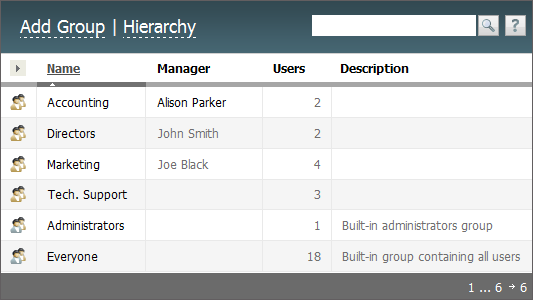
Several groups are automatically created at the installation of TeamWox, such as "Directors", "Marketing", "Administrators", "Everyone", etc. You can make any changes to the "Administrators" group except its access rights to the "Administration" module. It is impossible to edit the membership of the "Everyone" group. All the created users are added to it automatically. |
The upper part of the tab contains the following commands:
- Add Group — create a new group.
- Hierarchy — go to the viewing of hierarchy of created groups and users in the "Team" module.
Using the button  , you can adjust columns displayed in the list of groups. To sort the groups by name, click the name of the corresponding column.
The following commands will appear if put the mouse cursor over a group row:
 — disable the group (set the "Disabled" status);
 — delete the group (set the "Deleted" status).
In order to edit a group you should click with the left mouse button on its name in the list. All settings of the group are divided into the following tabs:
- Identification — common setting of the group.
- Permissions — the permission settings of the group.
- Communicator — access to specific features of TeamWox Communicator.
- Users — the membership of the group.
The process of editing a group is described below. To delete a group you should select the "Deleted" status for it while editing.
It is impossible to delete any group if there are users in it. |
← Backup
Identification →
|