
- Welcome
- Home
- Tasks
- Documents
- Service Desk
- Chat
- Organizations
- Contacts
- Board
- Team
- Products
- Accounting
- E-Bank
- Search
- Calendar
- Telephony
- Administration
- Groups
- Users
- Activation
- Articles
- Backup
- Connection
- Console Commands
- Export
- Firewall
- Overview
- Import
- Import from AD
- Journal
- Service Operations
- Modules
- News
- Permissions
- Requests
- Security
- Settings
- Sounds
- Statistics
- Updating
- Projects
Import of Users from Active Directory
You can import users from Active Directory into TeamWox. To start importing users, you should press the "Import" button located in the upper part of the tab "Administration -> Users".
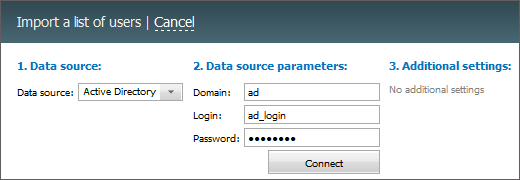
The process of importing consist of several stages:
1 Data Source
The following is specified at this stage:
- Data Source — in order to import from Active Directory one should choose the entry of the same name in this field. If you choose "Text file CSV", you will go to the corresponding type of import.
2. Data Source Parameters
The following parameters are specified here:
- Domain — name of the domain the user will be imported from.
- Login — login for connecting to the domain.
- Password — password for connecting to the domain.
3. Additional Settings
There is no additional parameters when importing users from Active Directory.
If the server where the TeamWox system is installed is not in the domain you want to import users from, you should specify the full name of the domain and user name in it. For example, Domain: "domain.local", Login: "domain.local\administrator". |
4. Selecting Records For Import
If authorization succeeds, the list of users to be imported will appear:
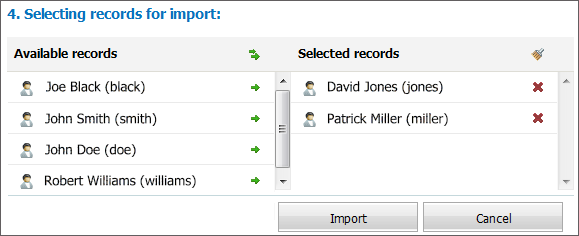
Users available in Active Directory are listed in the left part of the window. To add a user to the list of users to be imported (TeamWox), you should click with your mouse on the desired user in the left part of the window. The user will be moved to the list of users to be imported (the right part of the window). You may delete any user from the list of imported users by clicking on the user in the right part of the window.
If necessary, you may add all users to the list of users to be imported by clicking on the  button located to the right of the "Add All", above the user list of Active Directory. You can also delete all users from the list of users to be imported by clicking on the
  , button located above the list of users to be imported.
To start importing users, you should press the "Import" button located in the lower part of the window. To cancel import, you should press the "Cancel" button.
|