
- Welcome
- Home
- Tasks
- Documents
- Assigned
- Delete Mailbox
- Filters
- Email List
- Create/Edit Mailbox
- Create Mail
- Permissions
- Reply/Forward
- Reports
- Service
- Working with Spam
- View Mail
- E-Mail Widgets
- Service Desk
- Chat
- Organizations
- Contacts
- Board
- Team
- Products
- Accounting
- E-Bank
- Search
- Calendar
- Telephony
- Administration
- Projects
Create Mail
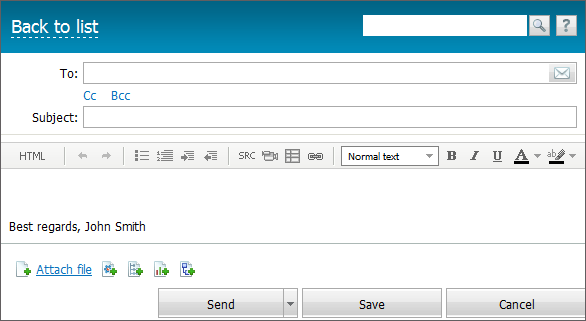
In order to create an e-mail, you should press the "New e-mail" button. The window of creating an e-mail appears, as soon as you press the button:
To/Cc/Bcc
The search of recipients in "Organizations", "Contacts" and "Team" is available in the "To", "Cc" and "Bcc" fields. Just start typing a name or e-mail address and the system will automatically display appropriate variants:
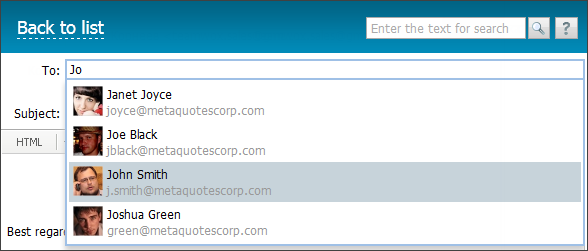
As you find a desired variant, click on it to add in the list of recipients.
From
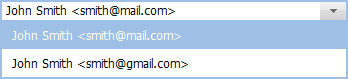
If you have several mailboxes in TeamWox, an additional field "From" appears above the "To" field. You should select in the pop-up list the mailbox to send your message from:
Subject
You should enter the subject of your e-mail in the "Subject" field.
Message Body
The integrated in TeamWox message editor serves for creating the body of the e-mail.
Once you have finished writing of an e-mail, you should press the "Send" button to send the e-mail. You can save the e-mail in "Drafts" by pressing the "Save" button. You will be passed to the previously visited window, as soon as you press the "Cancel" button. The e-mail won't be saved either.
If an error occurred while sending an mail, it is marked with the  icon in the list.
To quickly send an e-mail, one can press the "Ctrl+Enter" key combination. |