
- Welcome
- TeamWox Communicator
- Diagrams
- Editor
- Clipboard
- Comments
- HTML/VISUAL
- Link
- Creating Lists
- Inserting Code
- Styles
- Table
- Video
- Templates
- User Details
- Getting Started
- Browser Settings
- Calendar
- Calls
- Charts
- Exit
- File Viewers
- Filters
- Notifications
- Certificate Installation
- Interface
- List of Assigned
- Mind Map
- Permissions
- Search
- Status
- Google Translate
- Windows
- Home
- Tasks
- Documents
- Service Desk
- Chat
- Organizations
- Contacts
- Board
- Team
- Products
- Accounting
- E-Bank
- Search
- Calendar
- Telephony
- Administration
- Projects
HTML/VISUAL
In the message editor, there are two modes of message creation: HTML and VISUAL. You can switch between them by pressing the buttons of the same names on the editor's toolbar. The HTML mode is aimed at creating messages using the hypertext markup language (HTML). In this mode, conventional visual formatting tools don't operate. All tools become inactive, except the "VISUAL" button to be pressed for returning to the conventional (visual) message creating mode.
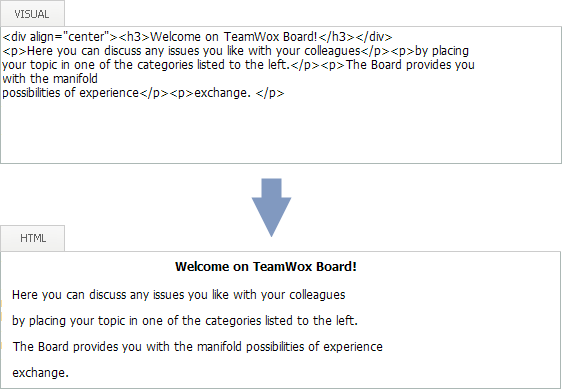
Let's consider a simple example: if you press "Enter" in visual mode, you will break a line. However, pressing the same key in the HTML mode, you will result in just a space between elements (words, for example).
In the image below, you can see an example of HTML (on top) and VISUAL (at the bottom) modes:
If you are in the VISUAL mode, you will see the "HTML" button in the editor's toolbar on the top. If you are in the HTML mode, you will see the "VISUAL" button there. |