
- Welcome
- TeamWox Communicator
- Diagrams
- Editor
- Templates
- User Details
- Getting Started
- Browser Settings
- Calendar
- Calls
- Charts
- Exit
- File Viewers
- Filters
- Notifications
- Certificate Installation
- Interface
- List of Assigned
- Mind Map
- Permissions
- Search
- Status
- Google Translate
- Windows
- Home
- Tasks
- Documents
- Service Desk
- Chat
- Organizations
- Contacts
- Board
- Team
- Products
- Accounting
- E-Bank
- Search
- Calendar
- Telephony
- Administration
- Projects
Link
You can insert links into a text using the  button. Also you can press the "Ctrl+Alt+L" key combination. It is enough to specify the link address in the field of the same name in the window that appears and press "OK".
Let's consider link manipulations in details:
Suppose you have a word or a group of words you would like to turn into a link. For this, you should select this word/phrase and press the button. After that, you should enter the necessary url into the "Link address" field of the window that appears and press "Insert":
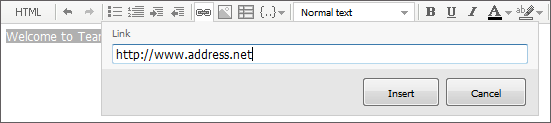
The entry will become a link. To remove the link leaving the text saved, you should put the cursor of your mouse in any location inside the text of your link and press the again. You should erase all text from the "Link address" field in the window that appears.
It is sometimes necessary to insert a link without titling it with a specially typed phrase. For this purpose, you should just open the window of inserting links and type the address in the corresponding field. Once the "Insert" button has been pressed, the corresponding link appears in the text as the address you have just typed:
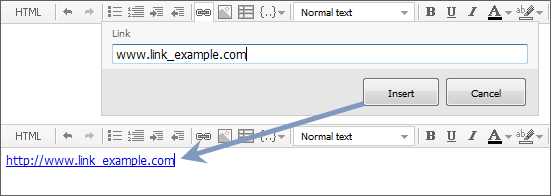
If you make a single left mouse-button click on a link while editing a text, three buttons will appear below it:
 — Open link. If you press this button, the link will be opened in a new tab or window of your browser.
 — Change link address. If you press this button, the window of editing the link will appear where you can change its address.
 — Remove link. If you press this button, the link will be removed, at the same time the text that appeared as a link before will be left.