
- Welcome
- Home
- Tasks
- Documents
- Service Desk
- Public Component
- Creating/Changing Groups
- Creating a Request
- Assigned
- Comments
- Deleting Groups
- Filters
- Integration
- List of Requests
- Monitoring
- Permissions
- Reports
- Status of Requests
- View Requests
- Widgets
- Chat
- Organizations
- Contacts
- Board
- Team
- Products
- Accounting
- E-Bank
- Search
- Calendar
- Telephony
- Administration
- Projects
Comments
All the main parameters of the request (title, assigned users, status, category, etc.) can be changed only using comments. This allows making the execution process transparent and easily controllable.
For adding a comment, press the  New comment button. By default the comment window is opened with hidden parameters of the request allowing to start writing the text. In order to open additional parameters, press the
  Details button located in the upper part of the comment window.
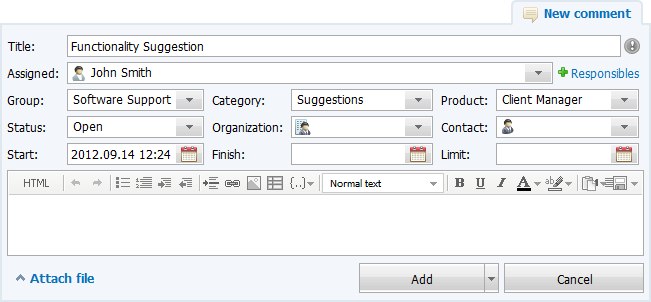
In this window any parameters set during request creation can be changed. This comment will contain corresponding entries:
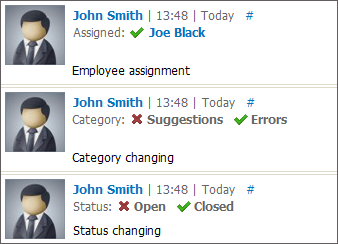
The previous state of the request parameter is marked by the  icon. Its state after the comment is marked by
  .
.
When pointing the mouse cursor over the comment, the "Reply" button appears, using which one can quote this comment in the reply. If you are the comment author or have permissions of the full viewing of the group, extra buttons "Edit" and "Delete" will appear when pointing the mouse cursor.
|
Private Comments
When working with requests that come from external resources the additional option "Private" appears in the comment window.