
- Welcome
- Home
- Tasks
- Documents
- Service Desk
- Public Component
- Creating/Changing Groups
- Creating a Request
- Assigned
- Comments
- Deleting Groups
- Filters
- Integration
- List of Requests
- Monitoring
- Permissions
- Reports
- Status of Requests
- View Requests
- Widgets
- Chat
- Organizations
- Contacts
- Board
- Team
- Products
- Accounting
- E-Bank
- Search
- Calendar
- Telephony
- Administration
- Projects
List of Requests
The list of requests occupies the main part of the Service Desk tab:
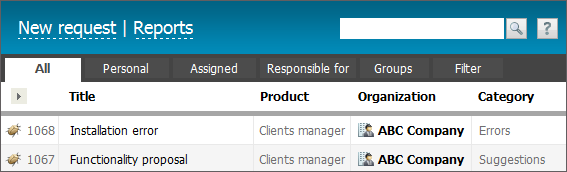
The list of requests can be easily adjusted. Pressing on  button will open the list of all available fields to be displayed. Select necessary fields and press "Apply".
- Title — title of the request.
- Product — product name, for which the request is created.
- Organization — organization with which the request is bound. Requests can be assigned to any organization added to the corresponding module.
- Contact — contact person with whom the request is bound. Requests can also be bound only to contacts added in the system.
- Category — category, to which the request belongs.
- Author — user who has created the request.
- Creation date — date of request creation.
- Modification date — date of the last comment (modification) in the request.
|
Titles of unread requests are shown in bold letters. When a new request is added or existing one is modified, the notification sign  appears in the upper right corner of the window.
Using the "New request" button located in the upper part of the tab you can create a request. The "Reports" button will show the corresponding information.
Requests with Execution Time Limit
If an execution time limit is specified for the request, then the color of its background is changed when the execution time approaches or it is expired. If there are 24 hours left before the request expires, its background becomes green:

If the execution time is expired, then the background of the request becomes red:

Fast Viewing of Request
In order to quickly view the brief description of a request without entering it, you should hold the mouse cursor over its title:
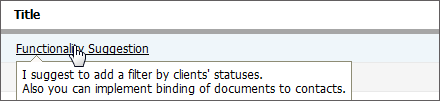
The beginning of the request text will be shown in a pop-up window.
Searching Requests
The search line is used for finding requests.
- If you specify a request identifier with the "#" symbol before it in the search line (for example, #1234), then after you press the
 button, you will go to viewing of the found request. One can search the requests in this way only while being in the "Service Desk" module.
 - If you don't specify the "#" symbols in the beginning of the search request, the search will be performed using the global search system of TeamWox.
Group Work with Requests
In order to start group working with requests, one should select them in the list. To do that, while holding the "Ctrl" key click with the left mouse button on each necessary request outside the links (for example, the name or number of request). Each selected request is highlighted with the blue background.
Once several requests are selected the additional button appear at the top of the tab:
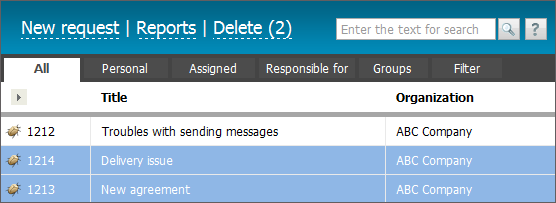
Only the procedure of deleting the requests in bulk is implemented at the moment. The number of selected requests is shown in brackets to the right of the "Delete" button.