
- Welcome
- Home
- Tasks
- Documents
- Service Desk
- Public Component
- Creating/Changing Groups
- Creating a Request
- Assigned
- Comments
- Deleting Groups
- Filters
- Integration
- List of Requests
- Monitoring
- Permissions
- Reports
- Status of Requests
- View Requests
- Widgets
- Chat
- Organizations
- Contacts
- Board
- Team
- Products
- Accounting
- E-Bank
- Search
- Calendar
- Telephony
- Administration
- Projects
Reports
Reports on requests are available in the "Service Desk" module. In order to view them, one should press the "Reports" button located in the upper part of the tab. The tabs of available reports will appear in the left part of the window as soon as you do this:
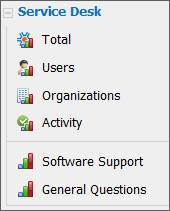
The upper box of the list contains four types of reports by all service groups. Reports by each service group are located below.
Total
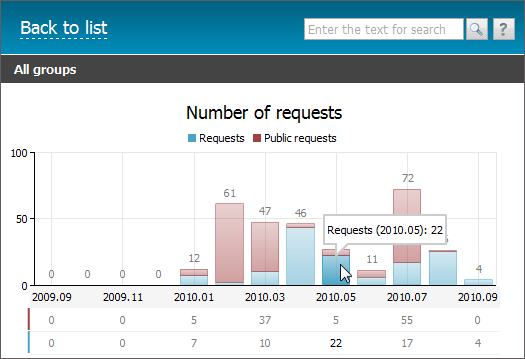
The "Total" report is the diagram of a total number of requests in the group by months. The internal requests are shown with the blue bars, and the external requests are shown with the red ones. When pointing the mouse cursor over a column, a tooltip with the number of requests and date will be shown.
Users
Below the general report there is a diagram of the number of requests by users.
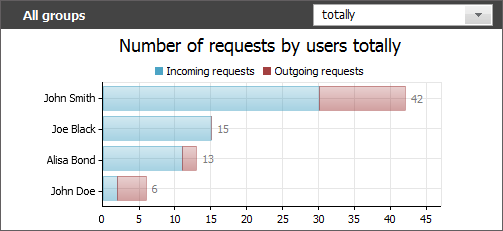
The red bars represent the number of request created by a user, and the blue ones represent the number of assigned requests.
For this report and for the reports by groups you can choose period, for which it will be shown. To do this, choose period in the upper part of the tab:
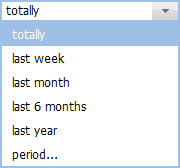
If the "period..." variant is chosen, the additional fields appear in the report title, where one can choose a custom period for report generation:

A period can be specified either manually or using the interactive calendar, that is opened by pressing the  button. Once the beginning and ending dates are specified, one should press the
  button.
Organizations
Further the statistics on organizations, to which requests were bound, is represented:
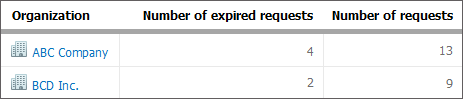
Names of organizations and number of requests bound to them are shown here. Press on the name to move to organization viewing in the corresponding module. The number of request with expired due date is also displayed here for each organization.
Activity
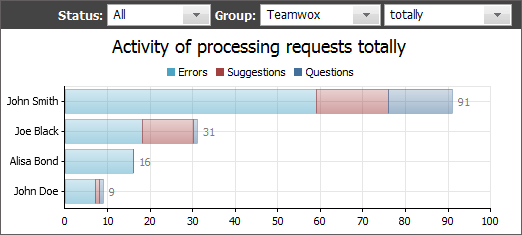
This report allows estimating the activity of employees in processing of requests. The report counts the number of requests created by the employee as well as the number of requests in which they wrote at least one comment. All the request are divided into categories created in the selected group. Three fields for setting up the report are located in its upper part:
- Status of requests — in this field, you can select one of the statuses of requests (or all of them) the report will be made by;
- Group — in this field, you can select a service group the report will be made by;
- Period — in this field, you can select a time period the report will be made for.
Use "To list" button located in the upper part of the tab to view the previous page.
Using the context menu, one can print any report or export it in *.XLSX, *.XML, *.CSV or *.PNG formats. |
Report on a Group
By selecting the corresponding item in the report menu, one can view a separate report on each group.
The upper part of the report contains the name of a group, its visible name, and the name of user that created it. Using the  one can select a period the report will be displayed for. If you choose the "period..." item, two additional field appear. There you can specify a custom period using the interactive calendar.
Several report diagrams are displayed below.
Number of Requests
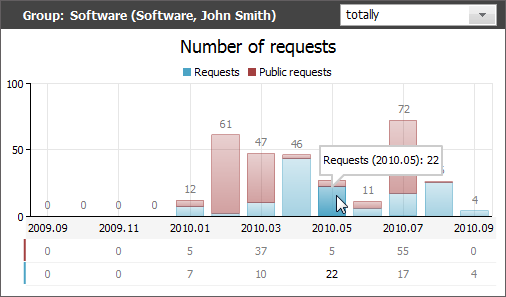
The "Number of requests" report represents the diagram of the number of requests in the group by months. The internal requests are shown with the blue bars, and the external requests are shown with the red ones. When pointing the mouse cursor over a column, a tooltip with the number of requests and date will be shown.
Number of Requests by Products
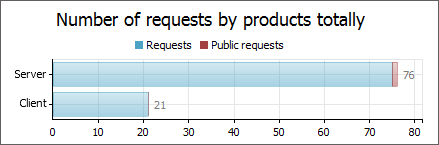
This report represent the number of internal public requests by products in the group.
Number of Request by Categories
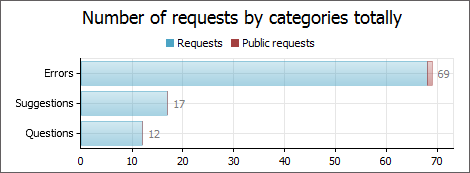
This report represent the number of internal public requests by categories in the group.
Number of Requests by Users
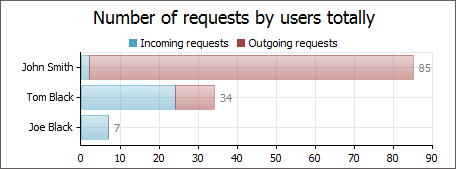
This report represent the distribution of incoming and outgoing requests in the group among users.
← Monitoring
Widgets →
|