
- Welcome
- Home
- Tasks
- Task Types
- Create/Edit Task
- Fast Filtration
- Task Filters
- Task List
- Permissions
- Task Privacy
- Reports
- Task Statuses
- View Tasks
- Tasks Widgets
- Documents
- Service Desk
- Chat
- Organizations
- Contacts
- Board
- Team
- Products
- Accounting
- E-Bank
- Search
- Calendar
- Telephony
- Administration
- Projects
Task Filters
Filters are used for the quick navigation in tasks. Filters are applied to each status of tasks, depending on which tab you are at the moment. Filters are located above the list of tasks:
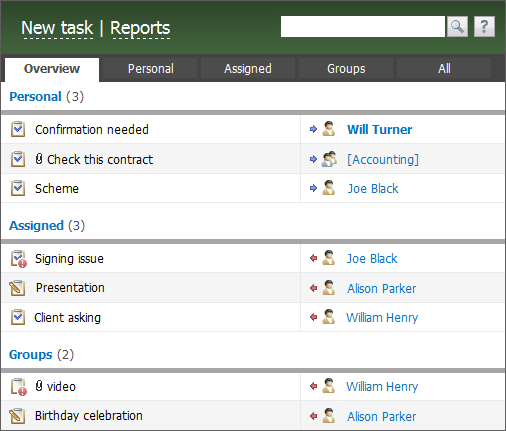
The following filters are implemented:
- Overview — this filter displays the last ten tasks of each filter: "Personal", "Assigned" and "Groups".
- Personal — this filter displays tasks that were assigned by you.
- Assigned — this filter displays tasks that were assigned to you personally.
- Groups — the filter of tasks that are assigned to the groups you are in.
- All — all tasks, filters are not applied.
- Filtered — creation of a custom filter of tasks.
Sorting is performed by the date of task updating but with the account for priority (tasks with high priority are located above common ones).
Tasks are displayed in three sections in the "Overview" filter. If you press on the name of one of them you will go to the corresponding filter. The number of tasks in a filter is shown in the right part in brackets.
Filtered
At this tab, a user can create a custom filter of tasks:
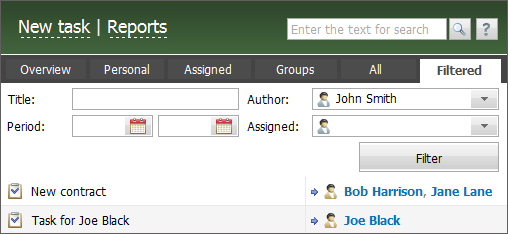
Tasks can be filtered by the following parameters:
- Title — a keyword which will be searched in all word forms within tasks titles.
- Author — filter by a user that created a task.
- Period — in this field you can specify a start and end date of task creation period.
- Assigned — here you can specify users or groups assigned to tasks.
To display tasks that satisfy specified criteria, click the "Filter" button.
Filter by Due Time
In the Open tab, you can filter tasks according to their due time (if set).
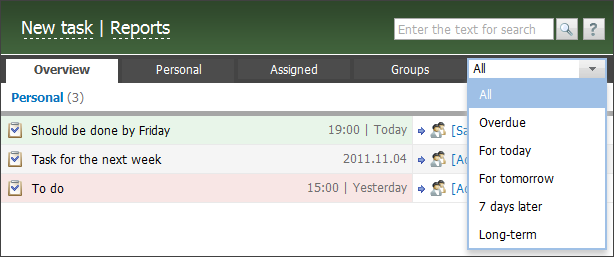
You can filter tasks by the following due conditions:
- All — all the tasks;
- Overdue — tasks with expired due time;
- For today — tasks, whose due time expires today;
- For tomorrow — tasks, whose due time expires tomorrow;
- 7 days later — tasks, whose due time expires within next 7 days;
- Long-term — tasks that expire more than 7 days later.