
Structure
This section is intended for viewing the structure of your company and fast navigating through the information about employees.
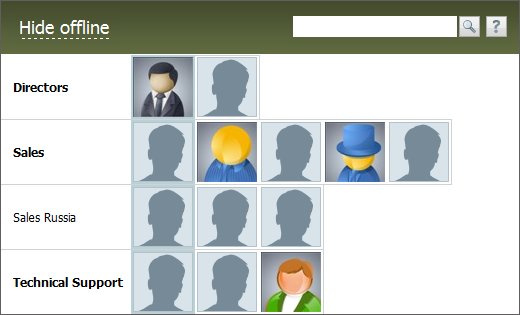
Using the "Hide offline" button, you can hide all employees that are not in the system at the moment. Ordinary employees will be hidden, and heads of departments will be brightened. To return to viewing of the full structure, you should press the "Show all" button.
The first column contains department names. The names of main departments are typed in bold. The names of their subdivisions are typed in normal fonts. The second column contains information about the head of each department, it has a special background color that differs from other employees.
Left mouse-button click on an employee's photograph (or icon, in case of its absence) will redirect you to the window of viewing the information about this employee.
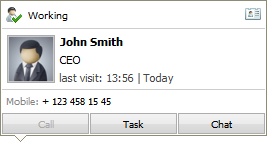
If you put the mouse cursor over one of employees, a pop-up window containing the information about his/her occupation and presence in the system should appear:
Presence in the System
If the employee is in the system at the moment, the following icon indicates it:  , the last fixed time of presence in the system is displayed after it. If the user is absent at the moment, the following icon will appear:
  . The fact of presence of an employee at his/her workplace is fixed in the system, as well. The following icons are implemented for this:
 and
and  . This situation is determined by a user's IP address. The range of working IP addresses can be defined in the window of worktime settings.
Status
Current status of the user is shown in the upper part of the window. For example, "Working".
Actions
If any IP-softphone is used in your company and telephone numbers of your colleagues in their profiles are specified in a certain manner (sip:telephone number), the "Call" button appears as active, so you can call the employee right from this information window. You can go to creating a task for this employee in the corresponding module using the "Task" button. At the same time, this employee is automatically selected in the "Assigned" field. You can start an internal dialog with the employee through the "Chat" module by pressing the "Chat" button.
If any of the buttons mentioned above are unavailable, it means that you do not have appropriate access rights to the modules. |