
Reports
Reports allow monitoring the work of users of the system with the "Products" module. In order to go to viewing of them, one should press the "Reports" button located in the upper part of the tab. After that the list of available reports will appear in the left part of the tab:
Only one report is implemented at the moment — "History".
History
This report displays the activity of adding comments to the history of products by users of the system:
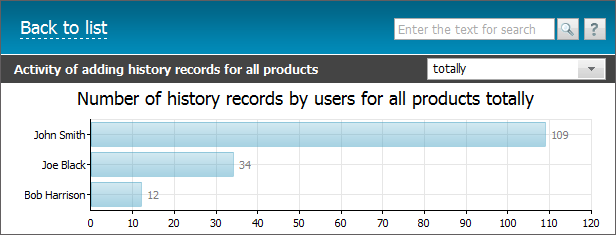
A pop up help containing the number of comments added by a selected user is shown if you put the mouse cursor over a bar of the diagram.
Here you can select a period the report should be formed for. To do it press the  button located in the upper right corner of the report. In the opened menu select one of the predefined periods. By selecting the "period..." entry, one can set a custom period. At that two additional fields will appear, there you should specify own dates using the interactive calendar that is opened by pressing the
  button.
← Import
Permissions →
|