
- Welcome
- Home
- Tasks
- Documents
- Service Desk
- Chat
- Organizations
- Contacts
- Board
- Team
- Products
- Accounting
- E-Bank
- Search
- Calendar
- Telephony
- Digital Receptionist
- Blacklist
- Callback
- Setup Example
- Inbound Rules
- Show log
- Outbound Rules
- Permissions
- Providers
- Reports
- Settings
- SIP Log
- Extensions
- Administration
- Projects
The "Telephony" Module
Module "Telephony" allows you to use the TeamWox groupware system as a telephone exchange based on Internet Protocol (IP-PBX).
Immediately after the module is enabled, without any additional settings, all employees are able to make calls within the company using the TeamWox Communicator. |
In order to make calls to external numbers and receive calls from them, the administrator must perform a simple configuration: specify parameters of the SIP-telephony provider, as well as set up call routing rules.
Thus, TeamWox can solve one of the essential corporate problems - organization of telephone communications, both internal and external.
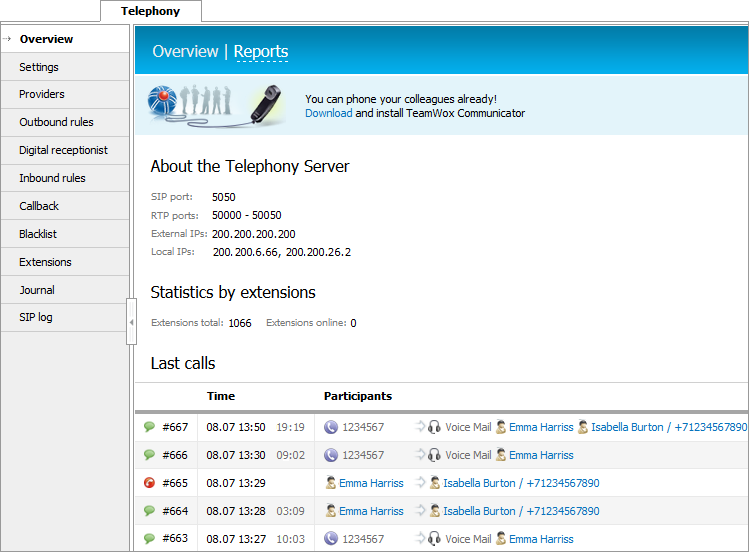
The following information is displayed on the home page of the module:
Telephony Server Details
This blocks displays settings of the telephony server:
- SIP port
- RTP ports
- External IP
- Local IP
Statistics by Extensions
This block displays statistics of extensions:
- Extensions total — the total number of active users in the system.
- Extensions online — the total number of users with the connected TeamWox Communicator.
Last Calls
Recent calls are displayed in this block:
- Started — time of call start. It also displays an icon corresponding to the type of call, as well as the call identifier intended to facilitate the search for Journal entries connected with the call.
- Duration — call duration.
- Caller — the name (for internal calls) or phone number of the caller.
- Callee — the name (for internal calls) or phone number of the called party.
- Comment — description of the call state.
Module Sections
On the left side of the page, you can navigate to different sections of the module:
- Settings — module settings.
- Providers — setting up SIP telephony providers.
- Outbound rules — configuring routing of outgoing calls.
- Digital receptionist — setting up the digital receptionist.
- Inbound rules — configuring routing of incoming calls.
- Callback — configuration of call back function on a website;
- Blacklist — configuration of restrictions on outgoing calls to specific numbers;
- Extensions — configuration of extensions.
- Journal — view the call log.
- Reports — reports of the module.