
Individual Payments
You can enter this mode either by pressing on an employee in the general list or by going to the "Payments" tab while viewing the information about an individual employee.
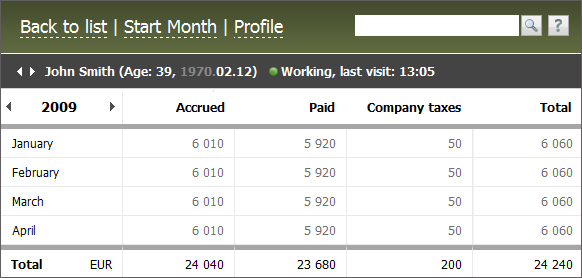
The information is represented in the form of a table by monthly information:
Description |
|
|---|---|
Accrued |
Accrued sum (Debit) by salary, bonuses, vacation pay and loans |
Paid |
Sum of real payments (Credit) by salary, bonuses, vacation pay and loans. |
Company Taxes |
Sum of accrued charges of company taxes (Debit). Only taxes related to the company payments connected with accruals to employees are taken into account here. |
The total exponent of company's expenses connected with the remuneration of labor of an employee. The sum of "Accrued" and "Company Taxes" factor minus the accrued fines and deductions (Debit). |
Personal taxes and other types of payments are not taken into account in calculation of factors mentioned above. |
The yearly amount of expenses differentiated by currencies is displayed in the bottom part.
Using arrows located in the heading of columns where months are specified you can choose the year to be displayed.
The "Start Month" button is intended for copying the payments information from one month to another one the same as it is described in the previous section. However, in this case the copying of information will be performed only for the chosen employee.
The "Profile" button appears only if you have the sufficient access rights. You can go to viewing and editing the employee's profile by pressing it. The "To list" button allows you to return to the viewing of payments information by all employees.
If you click on any field with one or another payment you will go to the editing of payments for the chosen month.