
Statistics
This section allows to view the statistical information about the company employees both by all of them or by separate departments. The statistical reports are represented considering the hierarchy of the company departments - the general one is above and then come the subordinate departments.
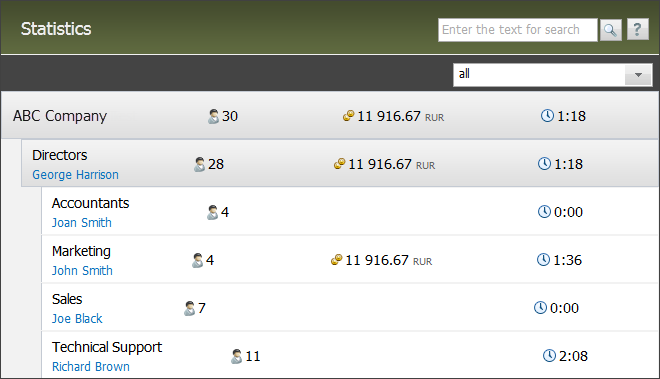
Using the  button that appear when you put the mouse cursor over the company or department name, one can expand or collapse the corresponding report.
The following information is displayed for the collapsed report on a department/company:
 — number of employees in the company/department.
 — average expenses on paying for one month of working of employees. The brackets near the name of this item contain the number of months the rate is calculated for. Counting of months starts from the first month within the chosen period when the payments were made.
 — average duration of working day of an employee.
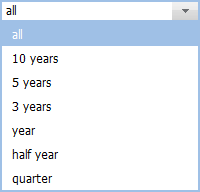
The upper part of the page contains a field where you can choose the period for which information in the reports will be displayed:
To view the statistics by an individual employee, one should enter them by clicking on their name and go to the corresponding tab. |
Company/Department Statistics
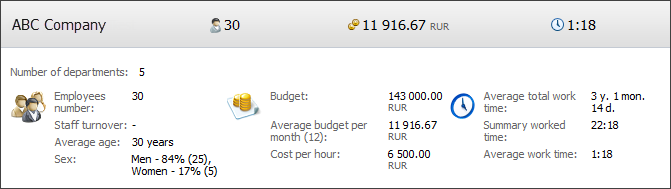
The following information is displayed here:
- Number of departments — number of departments in the company.
- Employees number — number of employees in the company.
- Staff turnover — the percentage ratio of employees fired during the chosen period to the working ones at the end of the period. The number of fired and working employees is specified in brackets.
- Average age — average age of the company's employees.
- Sex — distribution of employees by sex in percentage terms, the number of employees is specified in brackets.
- Budget — the total amount of money charged to the employees for the chosen period. This rate is calculated by the information at the "Payments" tab.
- Average budget per month — average expenses on paying for one month of working of employees. The brackets near the name of this item contain the number of months the rate is calculated for. Counting of months starts from the first month within the chosen period when the payments were made.
- Cost per hour — average cost of one working hour of an employee. This rate is calculated as a ratio of budget to the summary worked time.
- Average total work time — average period of working of company employees. This rate is determined on the basis of the "Working since" field in the profiles of employees.
- Summary worked time — actual time of working of employees within the chosen period. This rate is calculated by the number of working hours fixed in the "Working time" section.
- Average work time — average duration of working day of an employee.
|