
Settings
In order to start setting up the "Contacts" module, one should press the " Settings" button located in left part of the module under the filters. Custom fields for specifying information about contacts can be added at the settings window.
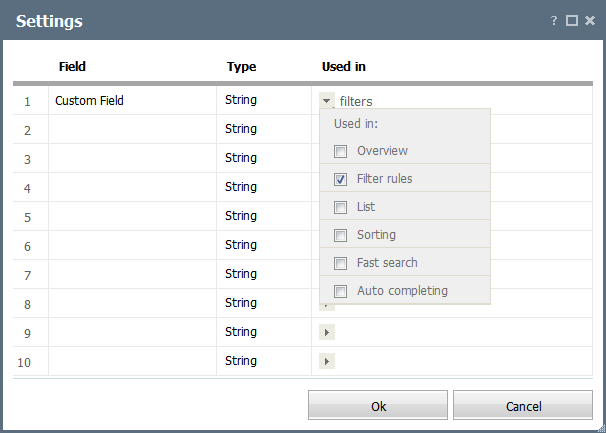
In order to add a custom field, one should set its name in one of the lines of this window. Each custom field has the following settings:
- Field — name of the custom field;
- Type — type of the custom field: string, number, date;
- Used in — using the
 button, choose the elements of the interface of the Contacts module, where the custom field should be displayed:
- Overview — display the custom field in "Main" section of contacts.
- Filter rules — use the custom field when creating rules for filters.
- List — display the field in the list of organization.
- Sorting — enable sorting the list of contacts by this field.
- Fast search — use the custom field for the quick search.
- Auto completing — if this option is enabled then the custom field will be shown in the "Overview" tab while viewing a contact.
If you delete a custom field, all its values will be deleted from all contacts. Also all the rules using this field will be deleted from all filters. |
← Reports
Permissions →
|