
Edit Working Time
You can pass to the working time editing mode by pressing on a day in the whole or individual calendar. Once you've pressed on any day against an employee's name, the following window should appear:
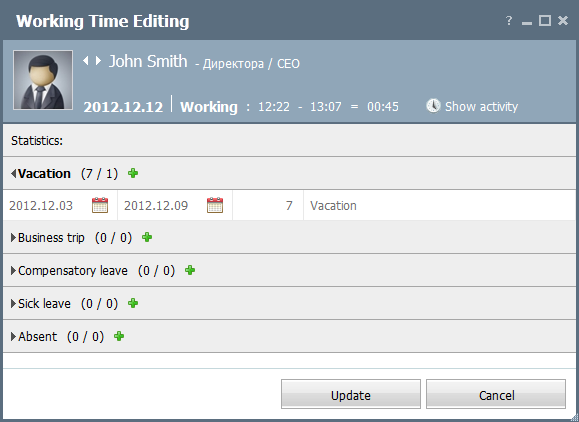
The name of the employee, his/her photo and position are specified in the top part.
The information on presence of the employee on the specified day is displayed below. The time of start and end of working can be modified manually. To do it, click on the corresponding field with the mouse and specify a new time. After a manual correction you can still view the time of presence of the employee automatically calculated by the TeamWox groupware. To do it, click  Show activity.
The information about the employee's attendance time for the current day is displayed below. Further, there is the "Statistics" box where the following information is specified:
- Vacation
- Business trip
- Compensatory leave
- Sick leave
- Absent
In order to fold or unfold one or another information section you should click with the left mouse button on the entry with its name. Each period consists of four fields: start date, end date, number of days and a comment. In order to edit a field you should double-click on it. The dates are specified via the interactive calendar.
In order to add a new entry, you should press the  button located in the heading of each information box. To delete an entry you should press the
  button that appears if you put the mouse cursor over it.
← Individual
Settings →
|