
- Welcome
- Home
- Tasks
- Documents
- Service Desk
- Chat
- Organizations
- Reports
- Add/Edit
- Autobinding
- Delete/Restore
- Export of Organizations
- Filters
- Import of Organizations
- List
- Module Settings
- Permissions
- Settings
- View
- Organizations Widget
- Contacts
- Board
- Team
- Products
- Accounting
- E-Bank
- Search
- Calendar
- Telephony
- Administration
- Projects
Export of Organizations
For exchanging data with the other information systems, the feature of data exporting is implemented in TeamWox. In order to start exporting the organizations, one should press the "Export" button in the upper part of that module.
The export of data is performed only by the organizations that are in the currently selected filter. |
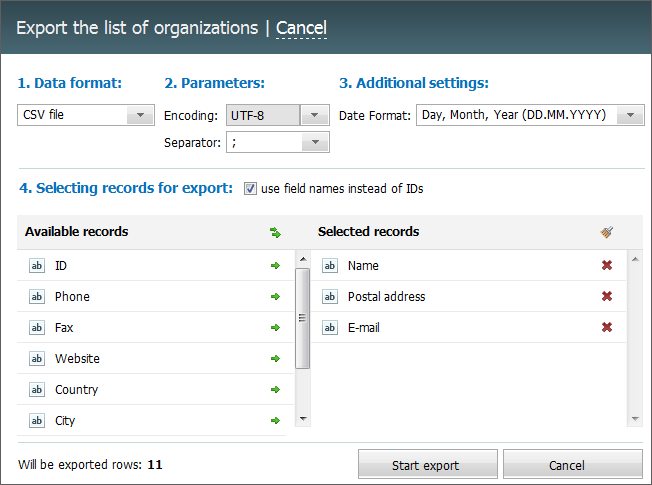
The process of exporting consist of several stages:
1 Data Format
At this stage you should select a type of file the information by organizations will be exported to. Currently the *.CSV, *.HTML and *.XML formats are supported.
2. Parameters
- Encoding — the selection of encoding which will be used for the export of data.
- Separator — separator that will divide different data by organizations in the file (comma, dot or tabulation character).
3. Additional Settings
Additional parameters are specified at this stage:
- Date format — the format in which the dates will be exported.
4. Selecting rows for export
In the lower part of the window you should choose which information by the organizations will be exported. In order to add a field to the list of exported ones, you should click with the mouse on its name in the "Available fields" column. To remove a field, click with the mouse on its name in the "Selected fields" column. To select or delete all the fields at once, you should press  or
or  button respectively.
|
In order to start the export, one should press the "Start export" button at the bottom of the window.