
- Welcome
- Home
- Tasks
- Documents
- Add Document
- Attachments
- Create Document
- Create Folder
- Delete/Restore
- Edit Folder/Document
- Filters
- Information
- List of Documents
- Permissions
- Reports
- Setting Up WebDAV
- Documents widget
- Service Desk
- Chat
- Organizations
- Contacts
- Board
- Team
- Products
- Accounting
- E-Bank
- Search
- Calendar
- Telephony
- Administration
- Projects
Attachments Copying
The "Documents" module provides the feature of copying attached files from other modules to its repository. Those can be the comments on the Board, in the history of the Organization and Contacts, the e-mails, etc.
In order to copy a file to the "Documents" module, you should press the  button that appears to the right of the attached file's name when you put the cursor of your mouse over it:
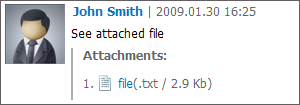
The window where you should specify the folder to save the file at will appear as soon as you press it:
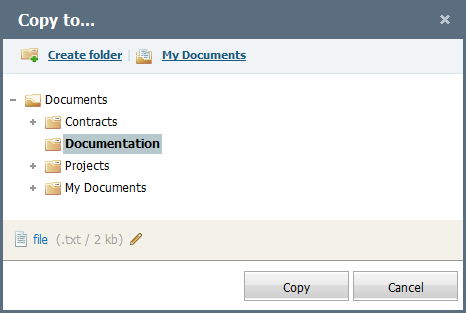
If you press the  button located in the upper part of the window, a new folder will be created in the currently selected folder. If you press the
  button, your private folder created for each user at first appearance in TeamWox will be automatically selected in the window.
The system also provides a possibility to edit the file name during copying it to the "Documents" module. To do it, you should press the  button that appears to the right of the file name if you put the cursor of your mouse over the area where the file is specified. Once you have pressed it, the file name field will become editable:

To complete editing of the file name, you should press with the left button of your mouse in any area except for the editing field.
Once you have specified the folder, press the "Copy" button. If you press the "Cancel" button, you will be passed back to the previous window and the file will not be saved.