
- Welcome
- Home
- Tasks
- Documents
- Service Desk
- Chat
- Organizations
- Contacts
- Board
- Team
- Products
- Accounting
- E-Bank
- Search
- Calendar
- Telephony
- Administration
- Groups
- Users
- Activation
- Articles
- Backup
- Connection
- Console Commands
- Export
- Firewall
- Overview
- Import
- Import from AD
- Journal
- Service Operations
- Modules
- News
- Permissions
- Requests
- Security
- Settings
- Sounds
- Statistics
- Updating
- Projects
Firewall
When integrating TeamWox with a website through the public components of the "Chat" and "Service Desk" module, the system receive anonymous, public and unauthorized requests. Website visitor can abuse these features and send unwanted requests and messages to the chat, what may cause inconveniences of working for the users of the system.
To avoid malicious requests, the feature of blocking of requests by IP addresses is implemented in the "Firewall" tab:
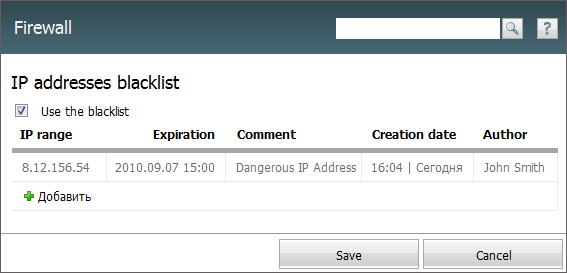
To enable blocking by specified IP addresses, you should turn on the "Use the blacklist" option, located in the upper part of the tab. This option also allows adding new entries into the blacklist. |
To add an IP address (or a range of addresses) into the blacklist, press the " Add" button. As soon as you do it, a new line will appear in the list; there you should specify the following details:
- IP range — this field is intended for specifying an IP address or a range of addresses (for example, 8.12.156.54-8.12.156.100), which should be blocked for receiving requests from.
- Expiration — this field is intended for specifying a date of expiration of the ban. This is done using the interactive calendar.
- Comment — text comments to the ban.
- Creation date — the automatically generated date of creation of the ban is displayed here.
- Author — this field displays the name of user that created the ban.
To change a field in a ban line, you should double click with the left mouse button on the necessary field. To delete an entry, press the  button, that appears when you put the mouse cursor over the line.
The access to the system by IP addresses can also be limited for each user separately. |