
- Welcome
- Home
- Tasks
- Documents
- Service Desk
- Chat
- Organizations
- Contacts
- Board
- Team
- Products
- Accounting
- E-Bank
- Search
- Calendar
- Telephony
- Administration
- Groups
- Users
- Communicator
- Contact Details
- Groups
- History
- Identification Details
- Permissions
- Personal Details
- Security
- Widgets
- Activation
- Articles
- Backup
- Connection
- Console Commands
- Export
- Firewall
- Overview
- Import
- Import from AD
- Journal
- Service Operations
- Modules
- News
- Permissions
- Requests
- Security
- Settings
- Sounds
- Statistics
- Updating
- Projects
Groups
You can include or exclude a user from a group on the "Group" tab. Each user is initially included in the "Everyone" group and cannot be deleted from it.
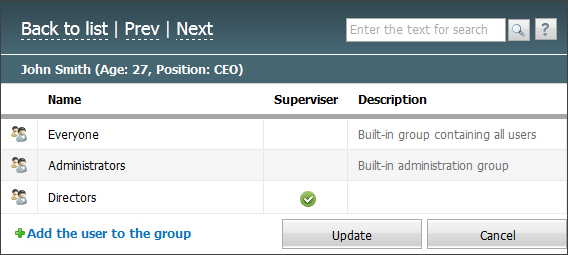
You can remove a user from a group by clicking  , which appears when you hover the mouse over the group line. To add a user to a group, click
 Add user to group. This will open a window for selecting groups.
For each of the groups, the "Manager" permission can be assigned to the user. It allows to modify the list of group members through a user profile. To assign the permission, click on the Manager field. After that, it following icon appears in it:  .
.
The "Manager" permission is not available for built-in default groups (Everyone, Administrators). |