
- Welcome
- TeamWox Communicator
- Calls
- Chats
- General Functions
- Contacts
- Key Shortcuts
- Installation and Connection
- Events
- Setup
- Diagrams
- Editor
- Templates
- User Details
- Getting Started
- Browser Settings
- Calendar
- Calls
- Charts
- Exit
- File Viewers
- Filters
- Notifications
- Certificate Installation
- Interface
- List of Assigned
- Mind Map
- Permissions
- Search
- Status
- Google Translate
- Windows
- Home
- Tasks
- Documents
- Service Desk
- Chat
- Organizations
- Contacts
- Board
- Team
- Products
- Accounting
- E-Bank
- Search
- Calendar
- Telephony
- Administration
- Projects
General Functions
The general functions of TeamWox Communicator include working with the status and search.
Status
Statuses in TeamWox are designed to show various information about yourself, such as the current work, to other users. There is one status both for the Communicator and the system, so if changed in one place, it changes in the other one.
In the Communicator, a user's status is displayed below the name:
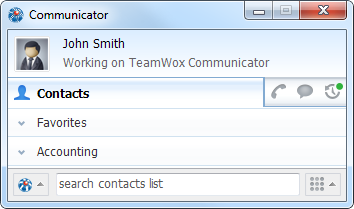
To change the status just click on its line and enter the text of the new status.
Search
The search engine allows you to quickly find information on any of the tabs of the Communicator: Contacts, Chat and Events.
The Search works as a data filter on a selected tab. As you enter characters into the search box, only the items that contain the specified combination will remain on the page. For example, it can be a group name, a user name in Contacts or Chat, or a task subject in the Events.
The Search works for all groups and contacts. Even if a group or a contact is hidden, it will be shown if the filter criteria are matched. |
Calls
If an IP-telephony is integrated in the TeamWox groupware, you can call at any phone numbers right from the Communicator. To do it, open the dialing pane in the lower part of the window by clicking  icon:
icon:
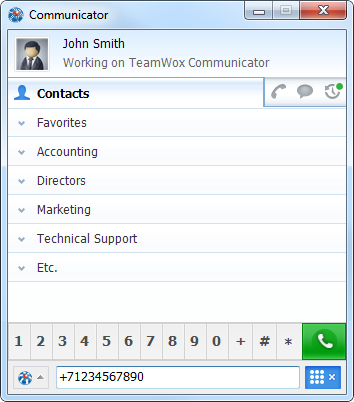
As soon as you specify a number using the buttons or your keyboard, click  . The call status is displayed in the upper part of TeamWox Communicator.
In order to search or make a call, just start typing a word or a phone number. The focus will be automatically moved to the search row/dialing pane. |