
- Welcome
- TeamWox Communicator
- Diagrams
- Editor
- Templates
- User Details
- Additional Details
- Calls
- Contact Details
- My Groups
- Personal Details
- Payments
- Softphone Settings
- Security
- Sessions
- Tabs Order
- Telephony
- Sounds
- Working time
- Getting Started
- Browser Settings
- Calendar
- Calls
- Charts
- Exit
- File Viewers
- Filters
- Notifications
- Certificate Installation
- Interface
- List of Assigned
- Mind Map
- Permissions
- Search
- Status
- Google Translate
- Windows
- Home
- Tasks
- Documents
- Service Desk
- Chat
- Organizations
- Contacts
- Board
- Team
- Products
- Accounting
- E-Bank
- Search
- Calendar
- Telephony
- Administration
- Projects
Sounds
The "Sounds" tab is intended for individual set up of various event notifications in the system. Common settings of sounds for all users are located at the "Administration" module.
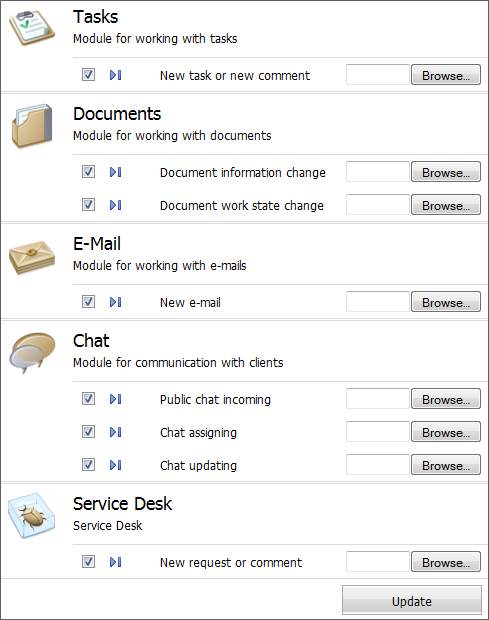
The tab is divided into five sections by different modules:
Tasks
- New task or new comment — a sound that will be played when a user has new task added or the existing one updated.
Documents
- Document information change — a sound that is played at changing information about a document that is assigned for reading or signing to the user.
- Document work state change — sound notification about signing or reading a document by one of the assigned users.
- New mail — a sound of a new incoming mail.
Chat
- Public chat incoming — a sound that is played when a public dialog is requested from external website.
- Chat assigning — a sound that is played when a user is invited to an internal dialog.
- Chat updating — a sound of new message coming to an existing dialog.
Service Desk
- New request or comment — a sound that will be played when a user has new request assigned or when a comment is added to an existing request.
In order to set up a sound you should press the "Browse" button in the corresponding field and choose an audio file in *.mp3 format in the appeared window. Using the  button you can listen to the new sound. The
  button allows to delete the uploaded sound.
Also each sound can be disabled. To do it you should untick the box against it.
In order to save the changes you made you should press the "Update" button located in the lower part of the tab.
← Tabs Order
Payments →
|